Short-form video is not just gaining traction—it’s taking over the attention economy. Powered by advancements in Generative AI, content creation has become faster, smarter, and more scalable than ever. From Instagram to YouTube and TikTok, you’ll find an endless stream of vertical videos competing for attention every second.
The real difference between scrolling and watching often comes down to one factor: communication without sound.
Research consistently shows that over 80% of social media videos are watched on mute. This means your content must deliver its message instantly—without depending on audio.
In our own testing using short clips (15–45 seconds), videos with clear, readable captions consistently achieved higher retention and completion rates. The improvement wasn’t occasional—it was repeatable across different content types.
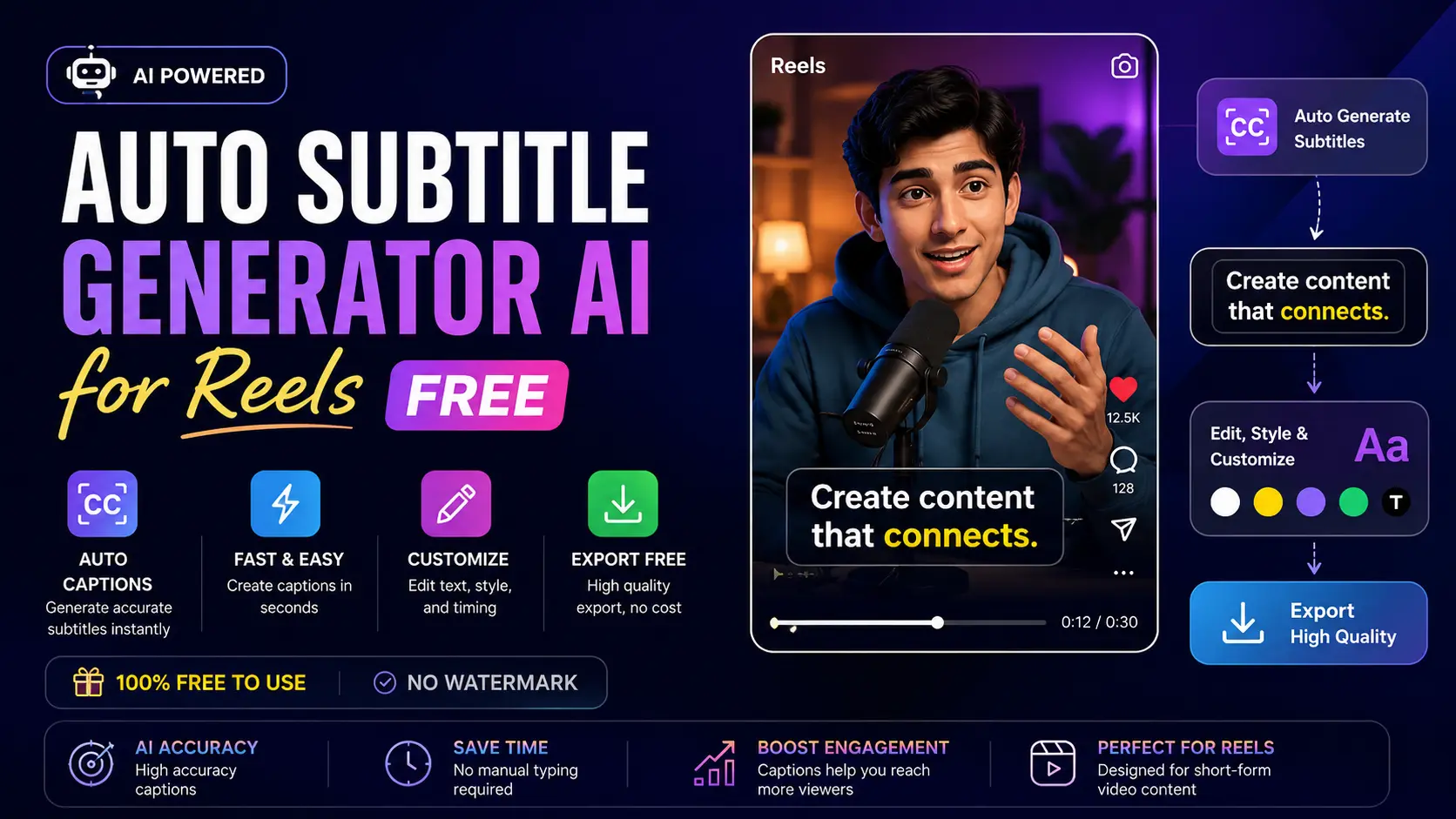
This is where an Auto Subtitle Generator AI becomes essential. Using Generative AI, these tools convert spoken words into perfectly timed subtitles within seconds, making content more accessible and engaging.
This guide focuses on practical, real-world strategies to optimize your AI Reels—helping you create content that not only gets viewed but actually holds attention, without unnecessary complexity.
What is an Auto Subtitle Generator AI?
Auto Subtitle Generator AI is software that generates subtitles from speech by automatically converting voice recordings into written text with timing. Rather than typing out the subtitles and timing them manually, the software takes care of both tasks.
Process Overview (Briefly Explained)
- Recognition translates audio to text
- Natural language processing cleans up grammar and punctuation
- Syncing engines time text to speech in real time
Input plays a critical role in the output’s effectiveness.
Why Do Creators Need It?
1. Less Time Spent Producing
Captioning content manually even for short videos may consume 20-30 minutes, while AI cuts down this process to around 5-10 minutes.
2. Ensures Accessible Content
Through captions, you ensure that the audience who is unable to hear or in environments where sound cannot be produced will also access your content.
3. Makes Videos More Engaging
Videos that come with captions are more engaging because the view time increases.
Why Subtitles Matter for AI Reels
Actual User Behavior
The average user consumes content passively; scrolling through it rapidly and typically without sound. If the message is not obvious at first glance, chances are it will be overlooked.
Results You Can Measure
- Increased Watch Time
Captions make sure that users remain interested for a longer period of time with your message reinforced visually
- Improved Retention
Key phrases presented on-screen aid understanding and retention of the material - Enhanced Distribution
Increased retention equates to increased quality according to platform algorithms
Global Access
Adding captions, especially those from different languages, helps expand the viewing base without needing any more videos.
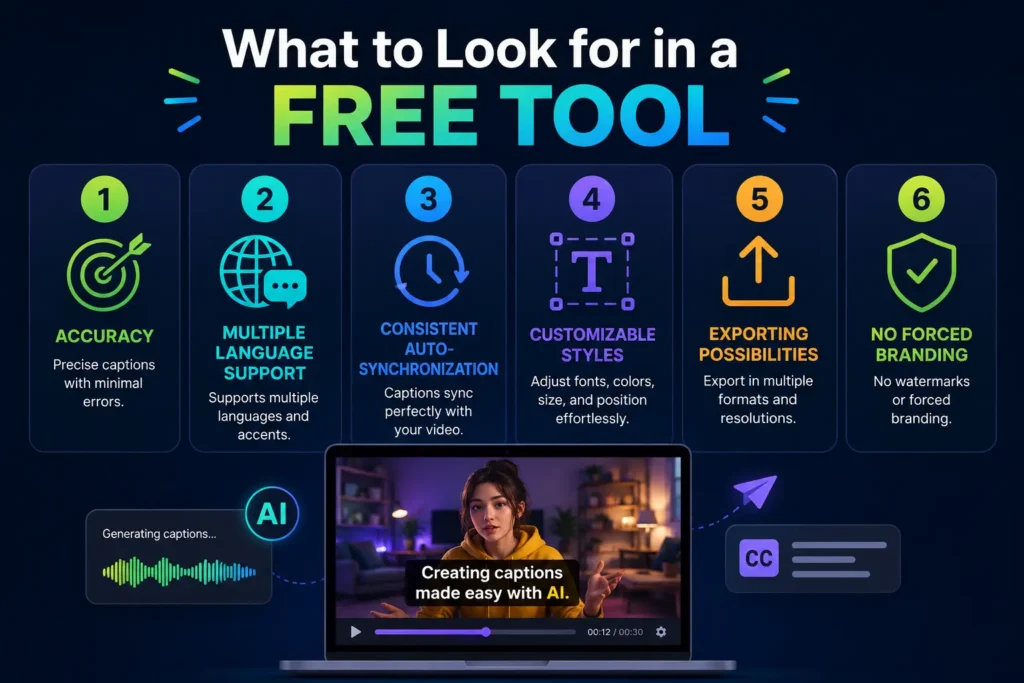
What to Look for in a Free Tool (That Actually Matters)
Choosing the right tool saves time and avoids frustration.
1. Accuracy (Why 85-95% is Important)
Accuracy refers to the correctness of the transcription of your voice.
- At 85-95%, all you need to do is make some corrections (e.g., punctuation or slight word changes).
- If the tool’s accuracy is below this, editing will take much more time than you save.
Reasons why it matters:
- गलत words = unclear message
- Low-quality captions decrease trust and professionalism
- People will not watch a video with poor subtitles
Tip: Good sound (no background noise, good microphone) improves accuracy better than changing the service.
2. Multiple Language Support (Increasing Coverage)
Multiple language support means that you can either create or translate subtitles into several languages.
Why it matters:
- You can reach a wider audience
- Useful if you want to reuse the same video in other countries
- It helps to become more discoverable
Examples:
1 video + English + Hindi + Spanish subtitles = Triple coverage
Tip: Especially important if you want to grow beyond local viewers.
3. Consistent Auto-Synchronization (Timing is Key)
Auto-synchronization ensures that the text appears at the exact moment the speaker says the words.
Why it matters:
- Bad synchronization = bad experience
- Badly timed captions disrupt the user experience
- Better synchronization helps improve watch time
What “good synchronization” means:
- Text appears along with the speech
- Matches pauses and sentence boundaries
- Feels natural to read
👉 Even a one-to-two-second lag will make your content seem unprofessional.
4. Customizable Styles (Legibility Beats Style)
This covers the font style, color, size, and location of the captions.
Why it matters:
- Captions have to be legible immediately
- Most consumers watch videos on their phones
Best practices include:
- Using high contrast (text is white and background is black)
- Using fonts that are clear and bold
- Making sure the captions do not cover the visual content
👉 While fancy animations might look nice, legibility makes the difference.
5. Exporting Possibilities (Ability to Grow)
A good tool will have several options for exporting your captions in various forms:
Primary forms:
- Embedded captions:
- Integrated permanently into the video
- Best option for using on Instagram Reels and Shorts
SRT files:
- Text file
- Allows reuse, editing, or uploading onto other platforms like YouTube
Why it matters:
- Provides possibility to recycle content
- Provides control when it comes to editing
- Enables scaling of content in the future
6. No Forced Branding (Professional Quality Result)
There are free tools that place a logo or watermark on your video.
Why it matters:
- Watermark diminishes brand reputation
- Makes the content less professional-looking
- Distracts the viewer from the message
When it’s fine:
- Testing tools
- Personal projects
When not recommended:
- Commercial projects
- Branding initiatives
- Paid promotions
👉 Professional quality result = better trust + brand recognition.
Feature Comparison
| Feature | Importance Level | Why It Matters |
| Accuracy | High | Ensures correct captions |
| Auto Sync | High | Improves viewing experience |
| Styling | Medium | Enhances readability |
| Export Options | Medium | Adds flexibility |
| No Watermark | High | Maintains branding |
Best Free Tools for AI Reels (2026)
Usability, Speed, and Output Quality-Based Assessment:
1. CapCut
What Sets It Apart?
Rapid production of subtitles.
Most Suited For:
Content creators creating daily reels (3-5 reels).
Real Talk:
Not much customization involved, but quick to make.
2. InVideo
What Sets It Apart?
Pre-built templates and automated captions.
Most Suited For:
Marketing agencies and brands making their videos.
Real Talk:
Offers free branding service.
3. VEED.io
What Makes It Stand Out:
Fast browser-based video editing with reasonable accuracy.
Best Use Case:
Freelancers who require fast edits without installing any software.
The Reality:
Limited export capacity could hinder growth.
4. Descript
What Makes It Stand Out:
Professional-level transcription with text-based video editing.
Best Use Case:
Content creators working on both long and short form videos.
The Reality:
Higher learning curve.
5. Canva Video Editor
What Makes It Special:
Good integration of design and easy to use subtitles feature.
Recommended for:
Those focused on their brand identity more than anything else.
Real Talk:
Poor control over subtitles.
Comparison Table
| Tool | Free Plan | Watermark | Accuracy | Best Use |
| CapCut | Yes | No | High | Daily reels |
| InVideo | Yes | Yes | High | Marketing content |
| VEED.io | Yes | Yes | Medium-High | Quick edits |
| Descript | Yes | No | Very High | Advanced editing |
| Canva | Yes | Yes | Medium | Design-focused content |
Real Use Case: What Actually Improved Performance
In a simple test across multiple short clips:
1. No Captions: Poor Retention, Fast Scroll Away
This implies that viewers tend to exit faster if there aren’t any on-screen texts in videos.
Reasons
Many users scroll through reels on their mobile devices with sound off.
If your reel depends on the voiceover only, users may fail to grasp its:
- Theme
- Significance
- Value
When there’s confusion regarding the purpose of a video, people tend to swipe fast.
Case Study
Assume your reel begins with:
Voiceover:
“Here’s the biggest mistake creators make…”
No captions, and the user is scrolling with mute on. They’ll fail to catch the attention-grabbing introduction.
Consequence: scroll away
This is what “fast drop-off” means.
2. With Captions: Clear Jump in View Time
This indicates that the viewer will stay tuned to your reel for a longer period of time with captions.
How does it work?
With captions, the viewer gets immediate context.
Even without sound, they get to know:
- The subject matter
- The message conveyed
- The benefit provided
This compels them to watch more.
Example
Not only the voice, but your reel displays:
BIGGEST MISTAKE CREATORS MAKE
- Now the viewer gets an immediate idea about what follows.
- Just that one line builds curiosity.
And increased curiosity = increased view time.
3. Important Factor: Emphasis on Keywords Enhanced Interaction Further
Emphasizing certain words led to more engaging captions.
It is not that all captions work equally well.
Regular captions do their job.
Strategically created captions work better.
What does “emphasizing keywords” mean?
Highlighting particular words by:
- Using bold lettering
- Colorful text
- Bigger size
- Animation
Example:
Ordinary caption:
How to grow faster on Instagram reels
Improved caption:
How to grow FASTER on Instagram Reels
Or
How to get 10X MORE VIEWS
The takeaway wasn’t just “add captions”—it was make them readable and intentional.
Also Know more about:
Top 10 Generative AI Tools in 2026 (Free & Paid)
AI Reel Maker from Text Free Tools and more
How to Generate Subtitles (Efficient Workflow)
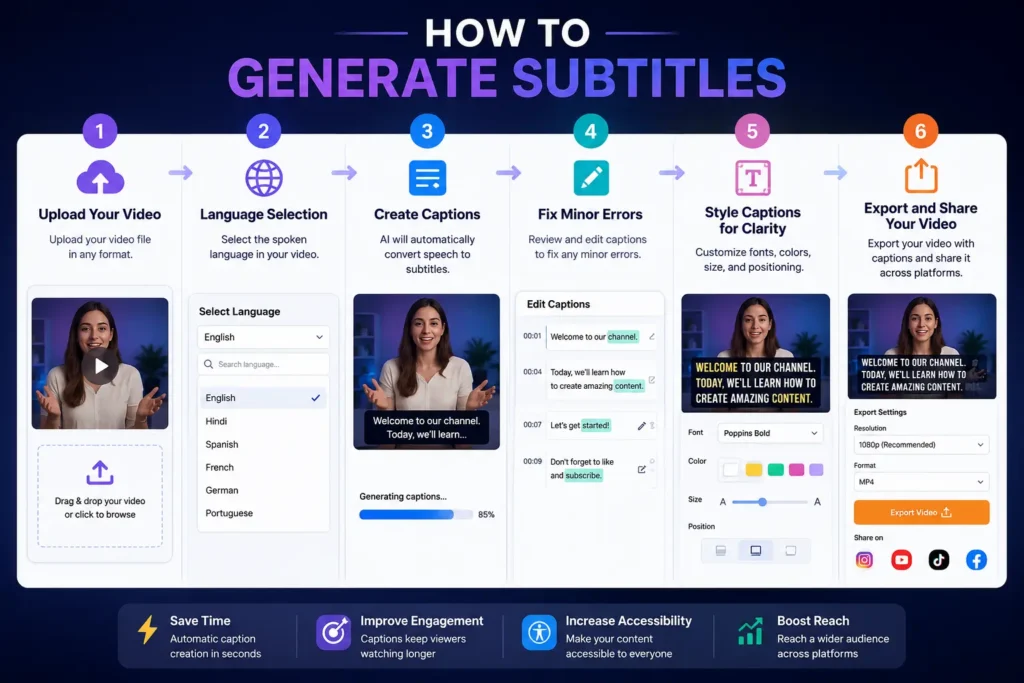
1. Upload Your Video
Here you upload your video in your video editor software (e.g., CapCut, VEED.io).
What to do:
- Upload your video once edited (no raw videos)
- Ensure that there is proper sound quality
Why it is important:
The AI requires sound quality. Poor sound quality means poor captioning.
👉 Pro Tip: Remove unnecessary content before uploading.
2. Language Selection
You select the language used in your video.
What to do:
- Select the appropriate primary language used (e.g., English, Hindi)
- Select the language used mostly in case of mixed languages
Why it is important:
The proper language improves the transcription process.
👉 Wrong language leads to wrong captions.
3. Create Captions
This is where the real AI action occurs.
How it works:
- The technology will scan through your audio
- Transcribe your voice into text form
- Then automatically create the captions for you
Time taken:
It generally takes several seconds to a minute
Why it’s important:
With this step, all your typing efforts are redundant.
4. Fix Minor Errors
Even advanced technology isn’t infallible, thus some editing.
What to look out for:
- Wrong spelling of words
- Inappropriate use of certain terms (names/ slang words)
- Unnecessary missing punctuation
Why it’s important:
These minor errors can:
- Alter the meaning
- Make your work seem unprofessional
- Erode credibility
👉TIP: Prioritize the correction of your most important parts.
5. Style Captions for Clarity
This is where you transform simple captions into high-performance captions.
How to do it:
- Make sure fonts are big enough for mobile devices
- Have high contrast (e.g., use white text on black background)
- Bold key terms
- Avoid placing texts in areas that obstruct faces/visuals
Why is it important:
Better styling = better readability = more viewing time
👉 Avoid excessive design. The clearer it is, the better.
6. Export and Share Your Video
The last step – prepare your video for sharing online.
Options for exporting:
- Burned-in captions (recommended for reels):
Caption is part of the video file - Subtitle file (SRT):
External subtitle file to share/re-use elsewhere (like YouTube)
How to do it:
- Vertical video format (9:16)
- High resolution (1080×1920 recommended)
- Upload directly to Instagram or other platforms
Why is it important:
Final video quality makes or breaks your professionalism online.
Once familiar, this process takes under 10 minutes per video.
Making Captions More Effective
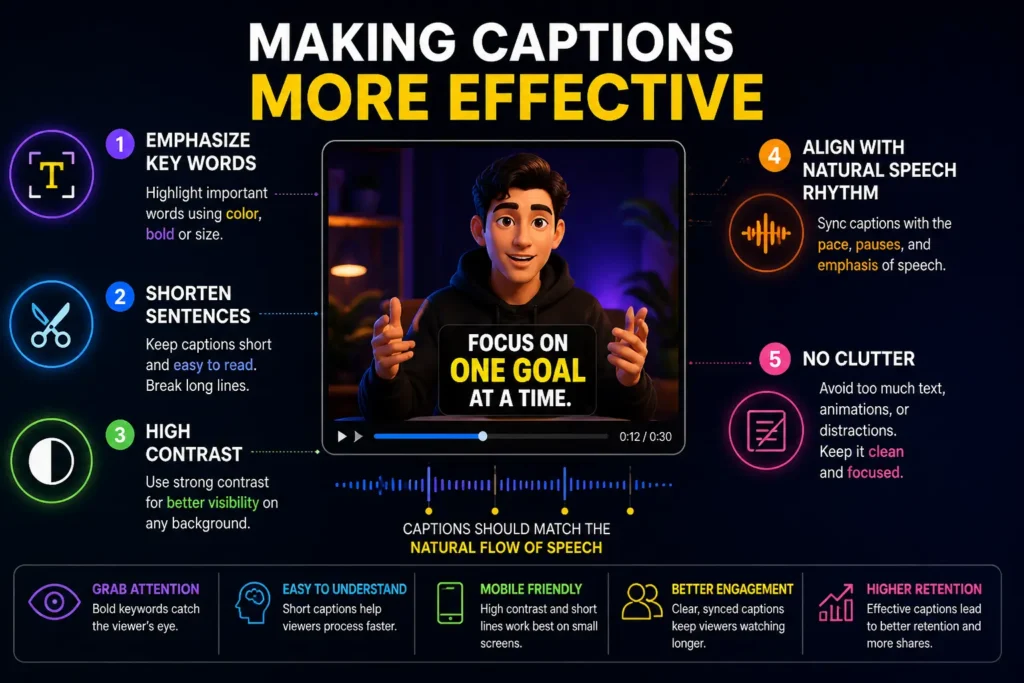
1. Emphasize Key Words
This involves giving visual importance to key words so that they catch viewers’ eyes right away.
What you can do:
- Use bold typeface
- Alter colors for key words
- Slightly enlarge the font size
- Add animation
Why it’s Important:
Viewers don’t read everything. They scan.
By emphasizing key words, you help them instantly get:
- The message
- The benefit
- The call
Example:
Instead of saying “how to grow faster on reels”
Say “how to grow FASTER on reels”
👉 “FASTER” immediately catches the eye.
2. Shorten Sentences
This entails splitting sentences into smaller parts that are easier to read.
Importance
Many viewers will be watching on mobile phones when scrolling through very fast.
Long sentences:
- Are harder to understand.
- Takes longer to digest information.
- Are usually bypassed.
Short sentences:
- Are easier to skim through.
- Fit in well with rapid content consumption.
- Enhance comprehension.
Example
❌ Long sentence:
“This is the best strategy you can adopt to grow your Instagram reels fast”
✅ Shorter sentence:
“This is the BEST strategy
to grow your reels FAST”
3. High Contrast
Contrast is the variation between the color of the text and the background.
The most effective combinations
- White text on black background
- Black text on white background
- Text with shadow or background box
Why it’s critical
Viewers will not attempt to decipher your captioning if they cannot understand it immediately.
Low contrast = unreadable text
High contrast = immediate readability
👉 Most crucial when filming against bright or chaotic backgrounds.
4. Align With Natural Speech Rhythm
Subtitles must appear precisely as the speaker says them and move fluidly.
- “Natural rhythm” explained
- Words show up as spoken
- Silences are timed naturally
- Lines are broken naturally
Why it’s important
When subtitles are:
- Too quick → difficult to comprehend
- Too slow → annoying
- Misaligned → disorienting
Perfect synchronization adds to the overall video professionalism.
5. No Clutter
Clutter is defined by excessive text or excessive graphic elements in a video.
Avoid
- Large chunks of text
- Different colors/fonts
- Animations
- Obscuring crucial images
Why it matters
Human brains interpret visual stimuli faster than words.
Non-cluttered captions:
- Increase attention
- Simplify content
- Create a professional impression
Simple tip
👉One concept per line only.
Common Mistakes That Reduce Impact
1. Going All-In on Automation without Checking
AI is speedy, but far from flawless.
What could go wrong
- Words misheard (e.g., names, slang, dialects)
- No punctuation
- Incorrect sentence splitting
Why does it matter?
Sometimes the smallest mistakes can:
- Alter the intended meaning
- Appear amateurish
- Undermine your credibility
Example
AI transcript:
“We should grow reels fast”
Real intention:
“We should grow real fast”
👉 One little word makes a huge difference!
Solution
Always give your captions a quick manual check (1-2 minutes) concentrating on:
- Opening line
- Message
- Action point
2. Using Hard to Read Fonts
Style does not equate to clarity.
The problem
- Glamorous fonts decrease readability
- Very thin fonts get lost in mobile viewing
- Overly designed captions become distractions
Why it matters
Average viewers:
- View on smartphones
- Scroll rapidly
Can’t understand what is being shown → ignore.
Negative examples
- Decorative script fonts
- Extremely thin fonts
- Excessively ornamental fonts
Solution
Use:
- Easy to read fonts
- Clear typography
- Uniform font style
👉 Readability always wins over creativity in captions.
3. Putting Too Much Text on Each Slide
Attempting to pack too much data onto the screen at once.
What’s going wrong?
- Large sentences cover the screen.
- The viewer doesn’t have enough time to read.
- Important messages are overlooked.
Why is it important?
Captions are meant to enhance the video, not overshadow it.
Example
❌ Overkill caption:
“This is the best strategy you can apply to help you grow your Instagram reels quickly and effectively”
✅ Better caption:
“BEST strategy
to grow reels FAST”
Solution
- Split sentences into smaller lines.
- Present one idea at a time.
- Maintain a clean visual presentation.
👉 Imagine: bite-sized text, not lengthy paragraphs
4. Poor Synchronization
Captions aren’t synchronized with speech.
Problematic aspects
- Text shows up too soon or too late
- Captions persist longer than required
- Synchronization appears unnatural
Importance
Poor synchronization leads to:
- Misunderstanding by viewers
- Unprofessional presentation
- Loss of engagement
Instance
- Speaker speaks → caption displays after 2 seconds
- Viewer has already shifted focus
Solution
- Synchronize captions with speech accurately
- Align with pauses and sentence endings
- Modify synchronization manually if necessary
👉 Proper synchronization should go unnoticed.
Free vs Paid: When It Makes Sense
Use Free Tools If:
- You’re starting out
- Posting occasionally
- Testing content formats
Upgrade If:
- You publish consistently
- Need brand-level quality
- Require bulk processing
Free vs Paid Comparison
| Feature | Free Tools | Paid Tools |
| Accuracy | Good | Excellent |
| Customization | Limited | Advanced |
| Export Quality | Standard | High |
| Watermark | Sometimes | No |
| Best For | Beginners | Professionals |
Conclusion
Captions are not an option anymore; captions are how you connect with your audience on social media today. With AI Reels, they play an important role in determining whether your video will be seen, understood, and shared.
Today, the benefit is that this process is very accessible for anyone. You won’t have to buy any expensive tools nor have any particular experience to pull it off.
Just start with one tool, try out things that work for you, and improve your processes along the way.
Because when it comes to short-form video content, there is no room for mistakes. It’s all about clarity.
Frequently Asked Questions (FAQs)
1. What is the best free Auto Subtitle Generator AI for reels?
Some of the best free tools in this regard are CapCut and VEED.io. These applications not only help generate subtitles quickly but also make editing easy and provide accurate captions for short videos.
2. Is it possible to generate captions for my AI reels automatically?
Yes, most of the Auto Subtitle Generator AI applications are capable of generating captions in seconds once the video is uploaded on them.
3. Does the use of any tool mean that I will get an output file with a watermark?
This may not be the case as some tools provide outputs without watermarks, while some include watermarks as part of their free services.
4. What are the accuracies provided by AI-based caption generating tools?
In most cases, the tools can produce about 80% to 95% accurate captions depending on the audio quality and clarity of speech.
5. Can I manually edit the generated subtitles?
Yes, most of the tools provide room for manual corrections once the automatic generation of subtitles is done.