Scan through any social media feed currently, and you will notice something—video shorts rule the roost. It could be any platform—YouTube Shorts, Instagram Reels, TikTok Shorts; users prefer video content that takes a few seconds to consume.
The problem with such a trend is quite apparent—you cannot make good-quality videos on the go without investing a lot of time into editing.
But what if you could do both?
This is precisely how Artificial Intelligence has helped solve such problems for content creators.
With the help of AI, you can create an entire video with just your text inputs, making it easier than ever to generate more video content.
In my experience using multiple AI-based platforms, the creators who started early in this process have been able to generate 3–5 times more videos.
What is an AI Reel Maker from Text?
AI Video Reel Creator from Text is an automated software that transforms textual material into a polished video clip ready to be uploaded.
But the strength of this software lies not only in its automation but in its intelligent context recognition.
Rather than just inserting random videos, it creates visuals according to your script, emphasizes crucial phrases, and structures your video in the best way possible to engage your audience.
How It Actually Works
Once you enter your text into the system:
- It breaks it down into small sections
- Recognizes the intention and important points of your text
- Selects appropriate visuals from its database
- Generates captions, transitions, and pace
In just a few minutes, you can accomplish tasks that would take hours of manual work.
The Technology Behind It
- Natural Language Processing (NLP): Tone and context comprehension
- Text to video engines: Transforming thoughts into pictures
- Speech synthesis systems: Providing believable voice
- Automated editing rules: Ensuring consistency and timing
This ensures that the final product is not only cost-effective but also high-quality.
Benefits of Using Free AI Reel Makers
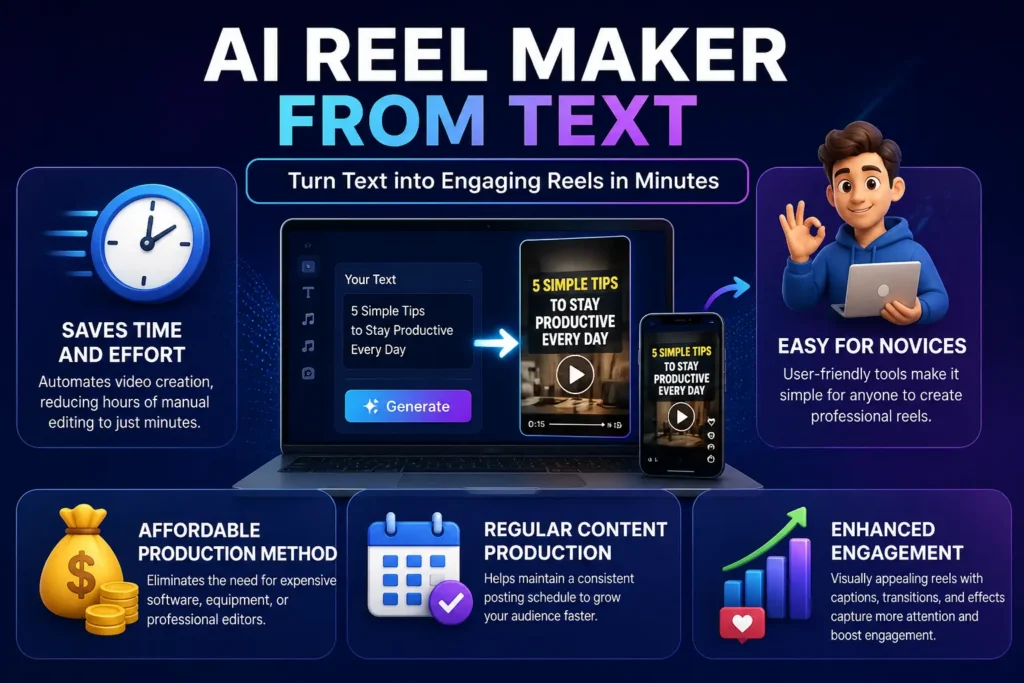
1. Saves Time and Effort
Video editing can become an incredibly laborious process for content creators.
Editing videos, syncing them with audio, and adding subtitles—all this consumes time. Automations make all of that disappear.
From the perspective of productivity gains, a video that could take 2-3 hours to create can now be done in less than 10 minutes.
2. Easy for Novices
You won’t need any previous editing skills.
Most online generators offer a simple-to-use interface—just paste your text, pick a template, and get results.
This explains how novices manage to produce their first Shorts video within a day.
3. Affordable Production Method
You may not have the budget to hire video editors.
With free platforms, you can produce enough quality content without spending money on advanced software and other resources.
4. Regular Content Production
Consistency is key to success.
As a matter of fact, content producers who regularly post on Shorts tend to have much greater reach than those who do not.
The technology makes it easier to produce content daily since it eliminates the need for editing.
5. Enhanced Engagement
Short-form platforms favor engagement.
Based on industry statistics, adding captions to your video can make people stay around 40% longer, and quick cuts work well with the Shorts algorithm.
The automation technology makes it easy to include these features.
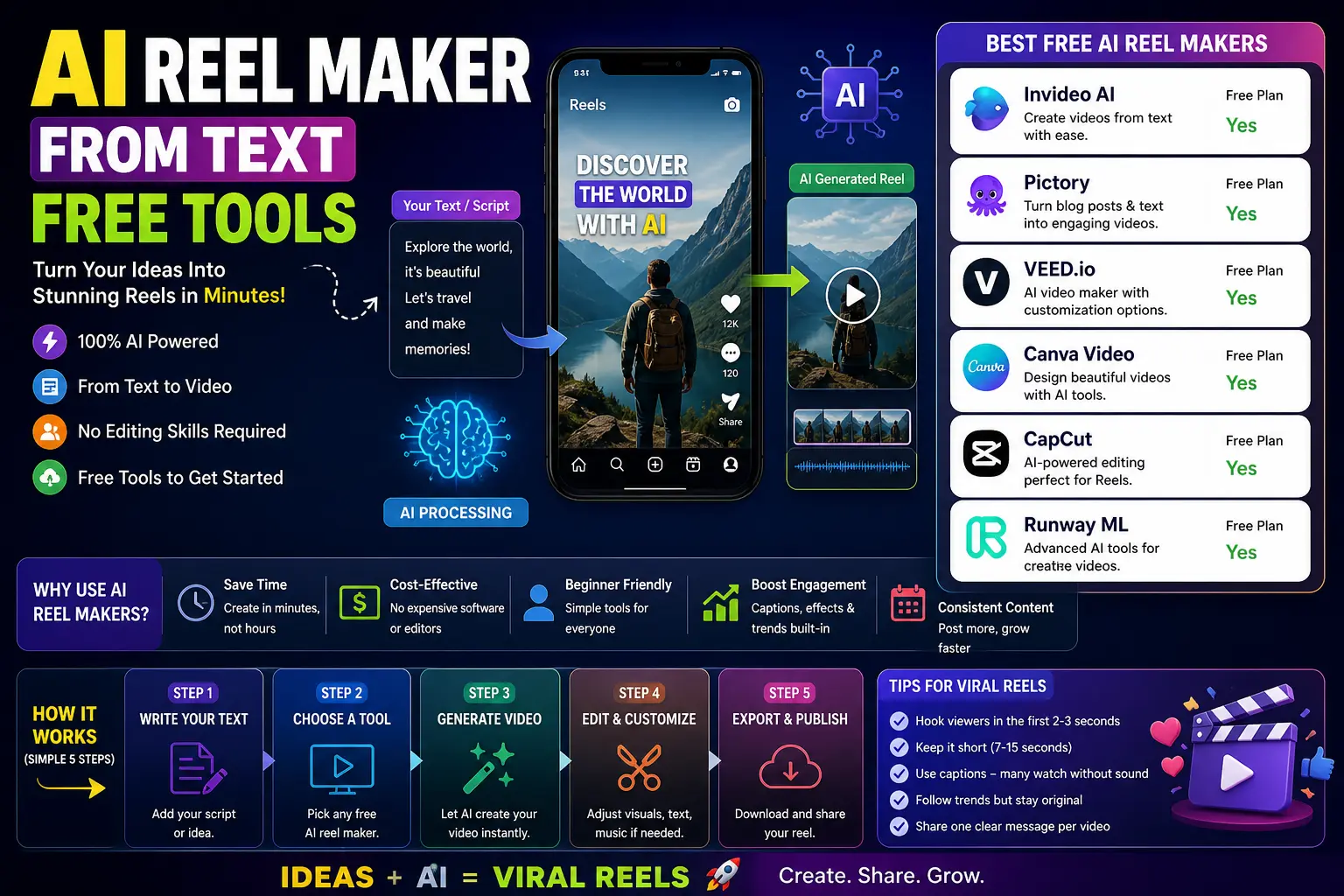
Best Free AI Reel Makers from Text (2026)
Here’s a closer look at tools that actually deliver results:
1. InVideo AI
This is where many beginners start—and for good reason.
You type a prompt, and within minutes, it generates a structured video with visuals and voice.
Best when: You want speed and simplicity
Watch out for: Limited customization in free plan
From testing, it’s one of the fastest tools to go from idea to publish.
2. Pictory
If you already create written content, this tool becomes extremely useful.
It converts blog posts into short videos, making content repurposing easy.
Best when: Turning articles into Shorts
Downside: Watermark in free version
3. VEED.io
This tool sits in the middle—automation plus control.
You get AI assistance, but still have room to tweak details.
Best when: You want flexibility without complexity
4. Canva Video Editor
Simple, clean, and familiar.
If you’ve used Canva for design, this feels natural.
Best when: Creating visually polished, minimal videos
Limitation: Less advanced automation
5. CapCut AI
This is one of the most practical tools for short-form content.
Everything—from captions to effects—is built for viral formats.
From experience, videos created here tend to perform well on Shorts due to their pacing and style.
Best when: Creating mobile-first, high-engagement content
Big advantage: No watermark in most cases
6. Runway ML
This is for creators who want to go beyond basic editing.
It offers more advanced features, including experimental video generation.
Best when: You want creative control and innovation
Challenge: Learning curve
Comparison Table – Best AI Reel Makers
| Tool | Free Plan | AI Voice | Templates | Watermark | Best For |
| InVideo AI | Yes | Yes | High | No | Beginners |
| Pictory | Yes | Yes | Medium | Yes | Bloggers |
| VEED.io | Yes | Yes | High | Yes | Social Media |
| Canva | Yes | Limited | High | No | Designers |
| CapCut | Yes | Yes | High | No | Mobile Users |
| Runway ML | Yes | Advanced | Medium | Yes | Advanced Creators |
How to Create Reels Using AI from Text
Step 1: Begin With a Clean Idea
Clarity is the key element of a good reel.
Avoid the temptation to write extensive paragraphs, and keep things focused on one message or outcome instead. Short form content works best if it can convey one idea only.
How to nail it:
- Forget long stories and think in hooks
- Limit your script from 1–3 lines
- Make sure you offer a solution, provide useful information, or pique people’s interest
Example:
- Bad: “In this video, we will talk about different methods…”
- Good: “Having issues with growing on Shorts? Here’s what helps.”
The clearer your idea, the more efficiently your tool will work.
Step 2: Opt for the Appropriate Format
There’s no room for experimentation when it comes to format choice.
As the platform YouTube Shorts is designed for watching content vertically, so should your video be.
Important points:
- Stick to 9:16 (vertical)
- Have a duration of 7–15 seconds for higher watch time
- Don’t forget to center the text for mobile devices
Why is this relevant?
When videos deviate from the platform format, they usually end up:
- Less visible to viewers
- With lower watch time
- Unengaging
Step 3: Generate The Video
This is where the heavy work will be done by automation.
After feeding your script into the software, the tool will:
- Pick out visuals
- Include transitions
- Add captions
- Develop the structure
The best way forward:
- Strive not to get perfect videos here
- Remember, this is just the first draft
In my experience, the best tools create 70-80% of usable content on the first go.
You’re supposed not to depend solely but to polish it up.
Step 4: Make Minor Changes
This is the factor that distinguishes good content from great videos.
AI provides the framework while manual editing makes them outstanding.
Areas to improve upon include:
- Substituting irrelevant visuals for more suitable images
- Shortening or refining the text for effectiveness
- Changing timings to fit captions and speaking
- Bringing in brand colors, fonts, and style
Expert tips:
Even 30-60 seconds of edits can make your videos better.
Most people forget about this.
Step 5: Export and Publish
Creating the video is one thing; getting it to your audience is another.
Before publishing:
- Write an effective caption (start with an attention-grabbing first line)
- Include appropriate hashtags (no spamming, focus on your niche)
- Select a good thumbnail frame if you can
Tips for optimization:
- Post regularly (daily or 3-5 times a week)
- Publish when your audience is online
- Experiment with different formats
An optimized post can make a big difference, even with basic content.
Also know more about:
Best AI Tools for YouTube Shorts
AI Video Editing Apps for Android and more.
Tips to Create Viral Reels
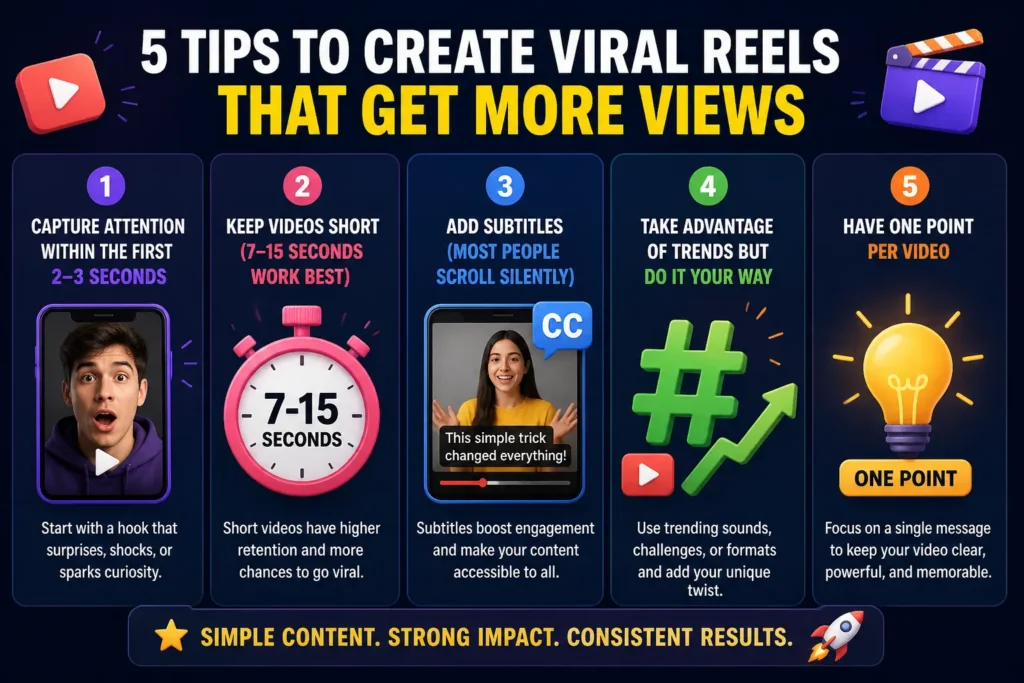
1. Capture Attention Within the First 2–3 Seconds
The opening sets the tone.
People typically scroll rapidly. Unless your video grabs attention immediately, they will skip over it—irrespective of how well your entire video performs.
How to do that:
- Start with a provocative statement or question
- Show the result first, followed by the explanation
- Create a sense of movement right from the beginning
Examples:
- “This one mistake is ruining your Shorts…”
- “See this before posting your next reel…”
What not to do:
- Long intros
- “Hey guys, welcome back…”
Think of your first few seconds as your ‘scroll-stopper.’
2. Keep Videos Short (7–15 Seconds Work Best)
Short videos generally have better performance because they are easy to finish and often re-watched.
Completion rates are key to platform algorithms. The higher the completion rate (including looping), the more widely your video will be seen.
Why 7–15 seconds?
- High attention span
- Chances for repeat viewing
- In line with consumption habits
Insider tip:
Some top-performing videos are even shorter than 12 seconds because they can loop perfectly.
It’s better to say one thing in a short video than several things poorly.
3. Add Subtitles (Most People Scroll Silently)
A big number of users scroll through videos without their sound on.
If your video relies solely on its audio, you’re automatically losing viewers.
The reasons to use subtitles:
- Boost accessibility
- Extend video watching time
- Strengthen message delivery
Tips:
- Keep text short and readable
- Emphasize keywords
- Synchronize captions with visuals
Subtitles are not optional; they’re necessary!
4. Take Advantage of Trends but Do It Your Way
Trends may increase the number of your views, but blindly imitating them usually won’t work.
The trick is to customize trends to fit your brand or message.
How to utilize trends:
- Utilize popular audio with a twist
- Add something unique to the trend
- Connect trends with audience interests
For example, instead of following a viral template exactly, think about:
“What can I do to make it relate to my content?”
Personalization is the secret behind success.
5. Have One Point per Video
Cramming too many ideas into one video overwhelms viewers.
What is effective?
Short videos should have only one point.
Why this is important:
- It increases clarity.
- It improves retention.
- It helps the viewer remember what was said.
The right way to do it:
- One tip.
- One thought.
- One issue and its solution.
Example:
- Note: “5 tips to grow quickly…”
- But: “Use this trick to double your reach.”
Common Mistakes to Avoid
- Relying completely on automation without reviewing
- Overloading videos with effects
- Ignoring aspect ratio requirements
- Using weak or unclear scripts
- Posting without optimization
Free vs Paid AI Reel Makers
Free Tools: Good for Beginners & Experimentation
If you are just starting your journey in the short-form videos space, then free tools will be the best way forward.
They provide you with the basic functions without having to pay anything upfront, making them great for beginners who want to learn how video-making works.
What Does It Provide?
- Basic text-to-video production
- Limited templates and styles
- Standard output quality
- Certain AI functionalities (captions and voiceovers, etc.)
- Access to trial versions of premium functionalities
Suitable For What Purposes?
- Ideal for beginners wanting to learn video-making
- Trying out new video concepts/niches
- Making occasional posts with minimal editing required
Drawbacks to Note
- Watermarks on output videos (mostly in all free tools)
- Limited customization capabilities
- Output videos of lower quality
- Restrictions on downloads/usage
To sum it up, free tools are best for beginners.
Paid Tools: Optimized for Scalability and Consistency
Once you begin publishing content on a regular basis or are building a brand, paid tools can provide more value.
These tools offer limitless possibilities and enable you to have greater control over quality and results.
Benefits of Using Paid Tools
- HD/4K quality export
- No watermarks
- Sophisticated editing capabilities
- Premium templates and resources
- Enhanced processing speed
- Branding features (logos, typography, color schemes)
Use Cases of Paid Tools
- Regular publishers of content
- Marketing professionals building a brand
- YouTube Shorts content creators seeking consistent growth
The Significance of Paid Tools in Scaling
As you scale your content creation efforts:
- Small gains in quality can have a large impact
- Branding becomes an essential element
- Time management becomes crucial
Paid tools are key to accelerating your growth and establishing credibility.
Use Cases of AI Reel Makers
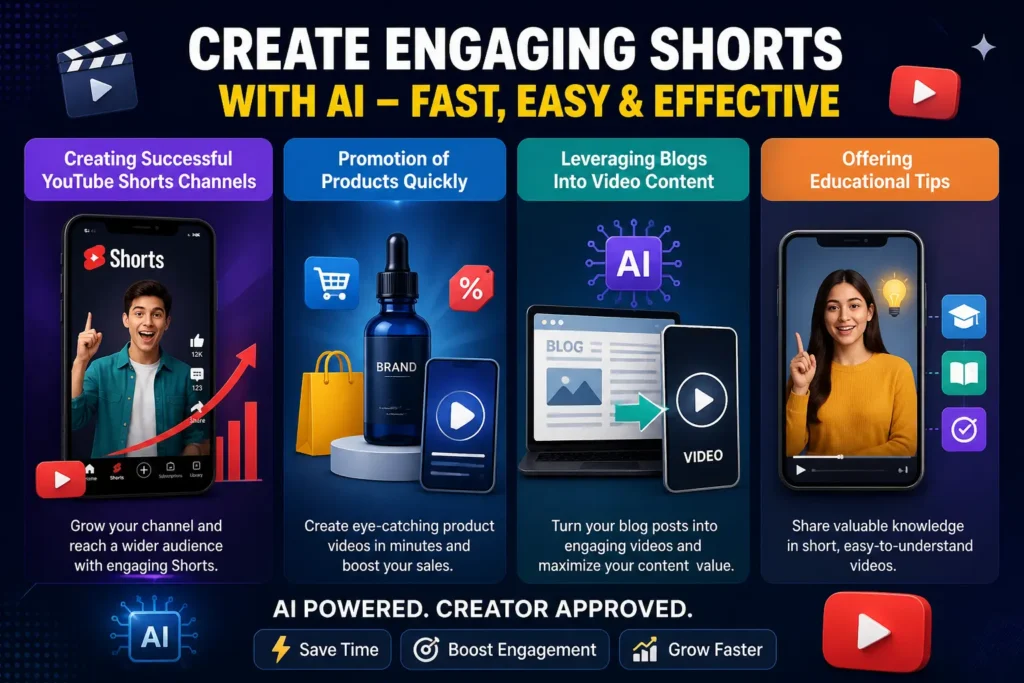
1. Creating Successful YouTube Shorts Channels
Success in YouTube shorts requires just one thing: constant uploading of engaging videos.
This is made possible through AI reel generators by eliminating the editing process that consumes much time.
How does it help?
- Converting simple concepts into videos fast
- Consistent posting on a daily basis
- Experimenting with different types of content without much difficulty
Example:
In the time you would edit a single video, you can generate 5-10 Shorts.
More content means greater chances of going viral.
2. Promotion of Products Quickly
Short videos are some of the quickest ways of promoting products.
AI helps to create the clips without necessarily having an elaborate video production arrangement.
How does it help?
- Convert your description of products into videos.
- Highlight product features in an appealing way
- Experiment with various forms of content creation
Example:
- Product benefits video
- Product uses video
- Video solving problem of customers
This makes quick experimentation of converting videos easier.
3. Leveraging Blogs Into Video Content
If you are currently writing content, you have a gold mine in hand.
AI tools can leverage blogs into video content, giving your content new life.
How this helps:
- Extract important information from articles.
- Create small video snippets out of it.
- Access people who enjoy video more than written content.
Example:
A blog post with 1000 words easily turns into 8-10 videos.
This allows for the creation of maximum content without having to write from scratch.
4. Offering Educational Tips
Educational content does exceptionally well in short forms—provided it is crisp.
AI tools make the process easier by presenting data visually.
How this helps:
- Break down complex concepts into shorter videos.
- Include captions for clarity.
- Visuals improve comprehension.
Example:
“1 quick tip to increase SEO”
“This is damaging your content.”
Short but valuable tips establish credibility.
Future of AI Reel Creation (2026 & Beyond)
But we are still at the very beginning of the transition—though things will move much faster than most creators expect.
It is not about improvements in video editing, but rather an entirely new approach to making videos.
In the near future, videos will be able to change their hooks, visuals, pace according to audience engagement. Voiceovers will become almost impossible to differentiate from human voice-over, and editing will happen instantly, without any need for additional work.
From what one can see at the moment, short-form content evolves in terms of speed, personalization, and production. Being able to create videos quickly and at the same time to do that professionally means having a significant advantage over other content creators.
And that is the truth—we are going to experience more competition.
Creators who begin using those tools earlier will have enough time not only to save some effort but also to get used to something new and understand how to use it properly.
So, the main idea is to evolve faster by learning something new, rather than working harder.
Conclusion
Short-form content is not taking a backseat; it’s only getting fiercer.
The new edge lies not just in creativity but in velocity and persistence.
The technology is advanced enough to enable you to create, experiment, and scale at an unprecedented pace.
The creators who move fast will reap the rewards.
Therefore, don’t overthink the process; use one piece of software, make your first video, and keep building momentum.
In this arena, it’s not the perfectionists but the consistent publishers who succeed.
Frequently Asked Questions (FAQs)
1. What is the best free AI reel maker from text?
The best free AI reel maker from text depends on your needs, but tools like InVideo AI and CapCut are widely preferred for beginners. They offer simple text-to-video features, ready-made templates, and fast video generation, making them ideal for creating YouTube Shorts and social media reels without editing experience.
2. Can I create reels from text for free?
Yes, you can create reels from text for free using several AI-powered tools. Most platforms provide free plans that allow you to convert scripts into short videos with basic features like templates, captions, and transitions. However, some limitations such as watermarks or export restrictions may apply.
3. Do AI reel makers add watermarks?
Many free AI reel makers include watermarks on exported videos, especially in their basic plans. However, some tools like CapCut and Canva allow watermark-free exports even in free versions, making them popular choices for creators who want clean, professional-looking reels.
4. Are AI reel makers effective for YouTube Shorts?
Yes, AI reel makers are highly effective for YouTube Shorts because they simplify video creation and improve consistency. They help creators quickly produce engaging, captioned videos that match platform requirements, which can increase watch time, retention, and overall reach.
5. Do I need editing experience to use AI reel makers?
No, most AI reel makers are designed for beginners and require little to no editing experience. These tools automate video creation by generating visuals, captions, and transitions from text, allowing anyone to create professional-looking reels with minimal effort.