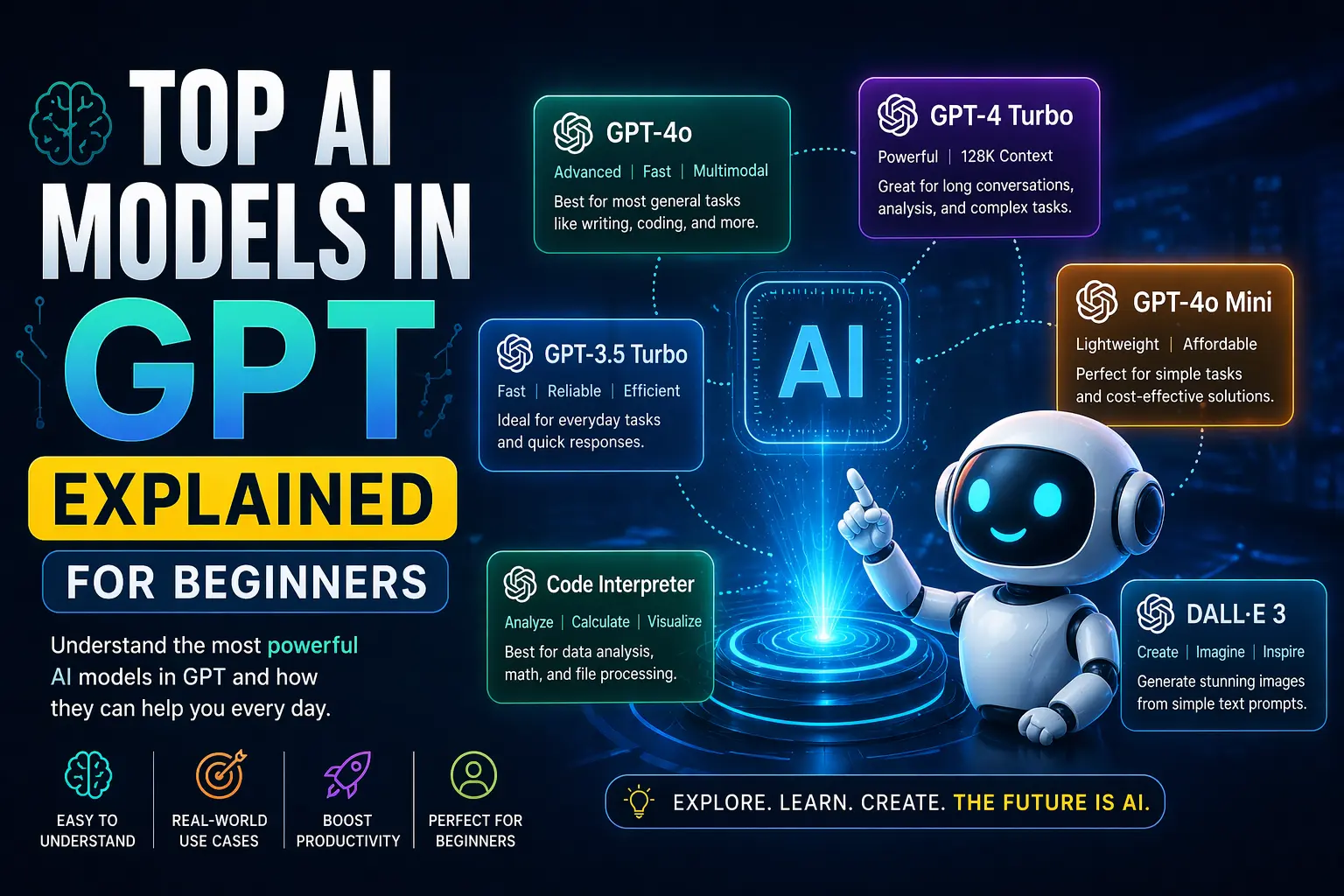
Artificial intelligence has quietly shifted from being a futuristic idea to something we interact with almost every day. Whether you’re searching online, writing content, or using smart assistants, there’s a high chance that intelligent systems are working behind the scenes.
What’s interesting is how quickly this transformation has happened. Just a few years ago, most systems were limited to basic automation. Today, they can write articles, assist with coding, answer complex questions, and even hold meaningful conversations.
At the core of this shift are AI Models—systems trained to recognize patterns and produce useful outputs. Over time, these models have become more advanced, but one major leap forward came with the rise of AI Models in GPT. Unlike older systems, these don’t simply follow commands—they understand context, adapt to different situations, and respond in a way that feels natural.
From a practical standpoint, this changes everything. Instead of relying on multiple tools for different tasks, users can now depend on a single system to handle a wide range of needs.
This guide is written for beginners, marketers, developers, and anyone curious about how these systems actually work. You’ll not only understand the basics but also see how they apply in real-world scenarios—something many guides often skip.
What Are AI Models in GPT?
To understand this properly, it helps to start with the basics.
Artificial intelligence models or AI Models are systems trained on large datasets so they can identify patterns and generate outputs—like answering questions, writing content, or making predictions. In simple terms, they learn from data rather than being explicitly programmed for every task.
Now, GPT stands for Generative Pre-trained Transformer. While the name sounds technical, the concept behind it is quite straightforward. It’s a system designed to understand and generate language in a way that feels natural and context-aware.
The biggest difference between traditional systems and modern GPT-based ones comes down to flexibility. Earlier systems were built for one specific purpose. For example, an email spam filter could detect unwanted messages, but it couldn’t write an email for you.
In contrast, AI Models in GPT can perform multiple tasks without needing separate programming for each one. They can write, summarize, translate, explain, and even assist with coding—all within the same system.
A simple way to look at it:
- Traditional AI works like a single-purpose tool
- GPT-based systems behave more like a multi-skilled assistant
This shift from rigid systems to adaptable ones is what makes modern AI significantly more useful in everyday situations.
How GPT AI Models Work
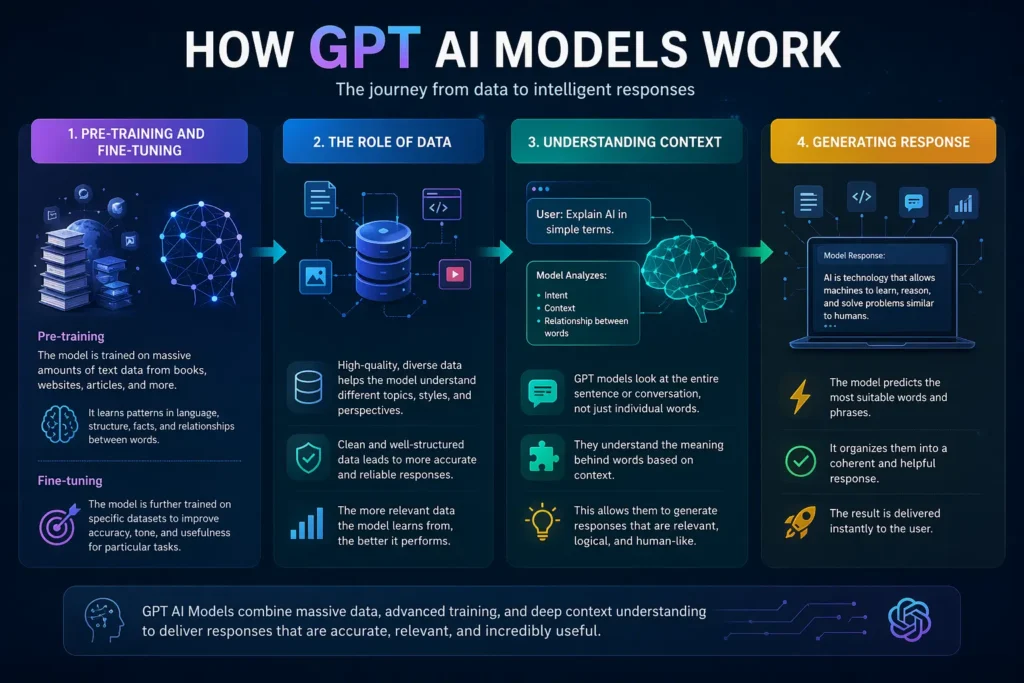
At first glance, these systems may seem complex, but the underlying process is easier to understand than most people expect.
| Step | What Happens | Simple Explanation |
| Input | User enters a prompt | You ask a question or give a task |
| Processing | System analyzes context & intent | It understands what you mean |
| Output | Generates response | You get a useful answer instantly |
Pre-training and Fine-tuning
The journey starts with pre-training. During this stage, the system is exposed to a massive amount of text data. It learns how language works—sentence structure, tone, context, and relationships between words.
After that comes fine-tuning. This is where the system is adjusted for specific tasks, making it more useful for real-world applications like answering questions or generating content.
The Role of Data
One thing that often gets overlooked is how important data quality is. The more diverse and well-structured the training data, the better the system performs. This is why some responses feel highly accurate while others may need refinement.
Understanding Context
Unlike older systems that processed text word by word, GPT-based systems analyze entire sentences at once. This allows them to understand context rather than just individual keywords.
For example, the meaning of a word can change depending on the sentence. These systems are designed to recognize that difference.
What Happens When You Enter a Prompt
Here’s a simple breakdown:
- You type a question or instruction
- The system evaluates intent and context
- It generates a response based on learned patterns
From a user’s perspective, it feels instant—but behind the scenes, it’s a highly optimized process.
Types of AI Models in GPT
Not all systems serve the same purpose. Depending on what you’re trying to achieve, different types come into play.
1. Language Models
These are the most widely used. They focus on generating and understanding text. From blog writing to summarizing long documents, they handle a variety of content-related tasks.
In real-world usage, many content creators rely on these models to speed up their workflow while maintaining quality.
2. Conversational Models
These are built for interaction. They simulate human-like conversations and are commonly used in chatbots and virtual assistants.
Businesses often use them to manage customer queries, especially during peak hours when human support teams may be overwhelmed.
3. Multimodal Models
This is where things become more advanced. These systems can process multiple types of input—such as text, images, and audio.
For example, you can upload an image and ask the system to describe it or generate related content. This opens up possibilities that go beyond text-based tasks.
4. Code Generation Models
These are designed to assist developers. They can write code, identify errors, and even explain complex logic in simpler terms.
From experience, many developers use these tools to save time on repetitive coding tasks while focusing more on problem-solving.
Top AI Models in GPT (2026 Overview)
As of 2026, these systems have reached a level where speed, accuracy, and usability have significantly improved.
Instead of focusing on specific names, it’s more useful to understand the capabilities that define modern systems:
- Faster response generation
- Improved contextual understanding
- Ability to handle multiple formats
- More accurate and refined outputs
Quick Comparison
| Model Type | Best For | Strength | Limitation |
| Language-Based | Writing & content | High accuracy | Needs review |
| Conversational | Chat & support | Natural responses | Context limits |
| Multimodal | Media tasks | Versatile | Resource-heavy |
| Code Generation | Programming | Time-saving | May need corrections |
Key Features That Make These Models Powerful
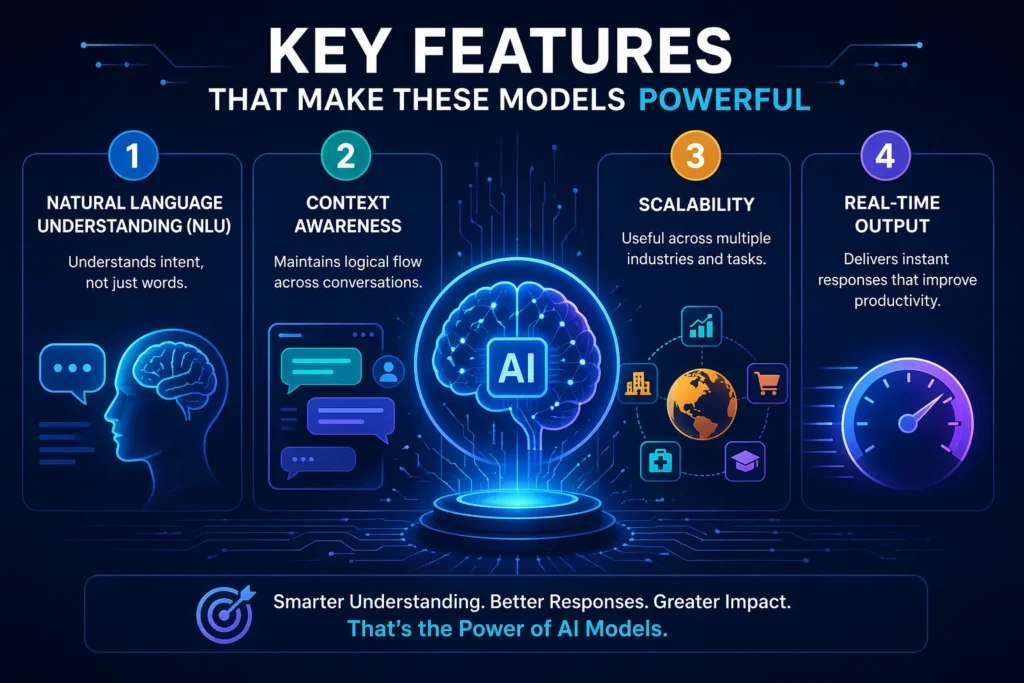
What makes these systems stand out isn’t just their capabilities—it’s how efficiently they perform tasks.
1. Natural Language Understanding (NLU)
At its core, this is what makes these systems feel intelligent.
Instead of simply reading words, the system tries to understand what you actually mean. It goes beyond keywords and focuses on intent, tone, and purpose.
In simple terms:
It doesn’t just process language—it interprets it.
Example:
If you type:
“Write a professional email for a job application”
The system understands:
- The tone should be formal
- The purpose is to apply for a job
- The format should follow an email structure
So instead of generating random text, it produces something that is ready to use with minimal edits.
In real-world use, this is why many people rely on it for writing tasks—it reduces effort while maintaining quality.
2. Context Awareness
Here’s where things start to feel more natural.
These systems don’t treat every input as a separate request. Instead, they follow the flow of a conversation and connect ideas across multiple prompts.
This is what makes interactions feel less robotic.
Example:
You ask:
“Explain AI in simple terms”
Then follow up with:
“Can you make it shorter?”
The system understands that “it” refers to the previous explanation—no need to repeat yourself.
Why this matters:
- Conversations feel smoother
- You don’t need to re-explain context
- Outputs become more relevant over time
Most beginners notice this only after a few interactions—and it’s usually the moment when the tool starts to feel genuinely useful.
3. Scalability
This is one of the most practical advantages, especially for businesses.
A single system can be applied across multiple tasks and industries without needing separate tools or setups.
One system can handle:
- Content creation
- Customer support
- Coding assistance
- Learning and research
Real-world insight:
In many businesses today, instead of using multiple platforms for different tasks, teams rely on a single solution to streamline operations.
This leads to:
- Lower costs
- Faster workflows
- Better consistency across tasks
From a practical standpoint, scalability is what makes these systems valuable beyond just experimentation.
4. Real-Time Output
Speed is where these systems truly stand out.
They can generate responses in seconds—even for tasks that would normally take much longer.
Example:
- Writing a blog outline → a few seconds
- Answering customer queries → instantly
- Generating code snippets → real-time
This directly improves:
- Productivity
- Efficiency
- Decision-making speed
If you’ve ever worked under tight deadlines, this is often the feature that makes the biggest difference.
These features are the reason why modern AI Tools are becoming essential in both business and personal use.
Know more about:
Top 10 Generative AI Tools in 2026
Trending AI Powered Gadgets in 2026 for Home and Office
Real-World Use Cases
| Use Case | How It’s Used | Benefit |
| Content Creation | Blogs, ads, emails | Saves time |
| Customer Support | Chatbots & automation | Faster response |
| Education | Learning & explanations | Better understanding |
| Development | Code writing & debugging | Increased efficiency |
| Business Tasks | Reports & automation | Improved productivity |
These systems are no longer experimental—they are actively used across industries.
Content Creation
Writers and marketers use them to generate ideas, outlines, and drafts. This is especially useful when dealing with tight deadlines or creative blocks.
Customer Support
Businesses automate responses to common questions, allowing human teams to focus on more complex issues.
Education
Students use these tools to break down difficult topics into simpler explanations, making learning more accessible.
Development
Developers rely on them to write code faster and troubleshoot problems efficiently.
Business Productivity
From generating reports to analyzing data, these systems help streamline everyday tasks.
Advantages and Limitations
✅ Advantages
- Saves time on repetitive tasks
- Improves efficiency and productivity
- Produces high-quality output quickly
❌ Limitations
- May occasionally produce incorrect information
- Requires human review for accuracy
- Can reflect bias depending on training data
The most effective approach is to use these systems as assistants rather than replacements.
GPT vs Traditional AI: Key Differences
Traditional systems are rule-based and designed for specific tasks. They perform well within those limits but lack flexibility.
Modern GPT-based systems, however, are learning-based. They adapt to different inputs and handle a wide range of tasks.
In practical terms:
- Traditional systems are predictable but limited
- GPT-based systems are flexible but require guidance
This adaptability is what makes them more relevant in today’s digital landscape.
How Beginners Can Get Started
Getting started is easier than most people expect.
Simple Steps
- Choose a user-friendly platform
- Start with basic prompts
- Experiment with different instructions
- Review and refine outputs
Practical Tips
- Keep instructions clear and direct
- Avoid unnecessary complexity
- Test variations to improve results
- Always verify important outputs
Most beginners see noticeable improvement within a few days of consistent use.
Future of AI Models in GPT (2026 & Beyond)
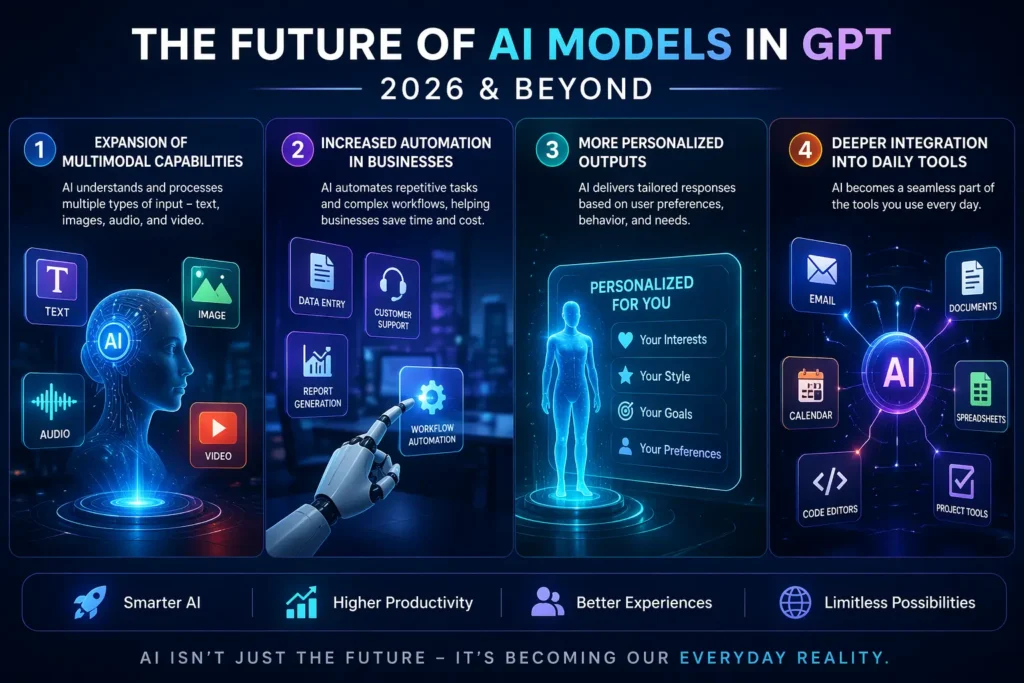
Looking ahead, the growth of these systems shows no signs of slowing down.
Some trends to watch:
1. Expansion of Multimodal Capabilities
This is one of the biggest shifts happening right now.
Multimodal simply means the system can handle more than one type of input—not just text, but also images, audio, and even video.
In simple terms:
Instead of only reading text, it can see, hear, and understand multiple formats together.
Example:
- Upload an image → ask for a description
- Provide text + image → get a combined explanation
- Use voice → receive spoken responses
In real-world use, this means fewer tools and more flexibility. You don’t need separate apps for text, images, and audio anymore.
2. Increased Automation in Businesses
Businesses are rapidly moving toward automation—not just for simple tasks, but for more complex workflows.
This means systems can now:
- Handle customer queries automatically
- Generate reports without manual effort
- Assist in marketing, sales, and operations
Real-world insight:
Many companies already use automation for repetitive tasks like FAQs, order updates, or email responses.
This doesn’t replace humans—it reduces repetitive work so teams can focus on higher-value tasks.
3. More Personalized Outputs
This is where things get more tailored.
Modern systems are improving at delivering responses based on user preferences, behavior, and needs.
In simple terms:
The output becomes more relevant to you, not generic.
Example:
- Content suggestions based on your interests
- Responses adjusted to your tone (formal or casual)
- Recommendations based on past interactions
From experience, this is what makes the system feel more “useful” over time—it adapts to how you use it.
4. Deeper Integration into Daily Tools
Instead of being separate platforms, these systems are becoming part of the tools you already use.
You’ll find them inside:
- Writing software
- Email platforms
- Business dashboards
- Development environments
Example:
- Writing emails with built-in assistance
- Auto-generating reports inside tools
- Getting suggestions while coding
This is a major shift—AI is no longer something you “go to.” It’s something that works quietly in the background while you work.
In the near future, interacting with AI may feel as natural as browsing the internet.
Common Mistake Beginners Make
One thing most beginners don’t realize is that these systems don’t always give perfect results on the first try.
In fact, expecting instant accuracy is where many people go wrong.
From practical use, the real value comes from:
- Refining your inputs
- Testing different prompts
- Understanding how the system responds
Once you start treating it as a tool that improves with interaction—not perfection—you’ll see much better results.
Conclusion
What once felt like complex technology is now becoming a real, everyday advantage for those who know how to use it.
Understanding AI Models and how they work within AI Models in GPT isn’t just useful anymore—it’s quickly turning into a must-have skill in today’s digital landscape.
But here’s the part most people overlook: Access isn’t the advantage anymore—execution is.
The real difference comes down to how you apply what you know.
Start small. Try different approaches. Don’t aim for perfection—focus on progress.
Because in real-world use, the people who experiment, adapt, and learn faster are always the ones who stay ahead.
And in a space evolving this quickly, waiting isn’t safe—it’s falling behind.
Frequently Asked Questions (FAQs)
1. What are AI models in GPT?
They are systems trained to understand and generate human-like responses using large datasets and advanced language processing techniques.
2. Are GPT-based tools free to use?
Many platforms offer free versions, but premium features usually require a subscription.
3. Which model is best for beginners?
Beginner-friendly platforms with simple interfaces and guided prompts are ideal for getting started.
4. Can these systems replace human jobs?
They are designed to assist rather than replace. Human creativity and decision-making remain important.
5. How reliable are these systems?
They are highly capable but not perfect, so reviewing outputs is always recommended.